Tuesday, 7 January 2014

How to remove all Custom option of all Products in Magento ...


In magento root folder create one custom folder with any name and create index.php file into the custom folder and run this line once

<?php
require_once '../app/Mage.php';
Mage::init();
Mage::getModel('catalog/product_option')->getCollection()->walk('delete');
?>

Sunday, 5 January 2014

Installing Yii Framework in XAMPP

Installing Yii Framework in XAMPP

Here I will discuss the details of the installation steps Yii Framework. But before, there are some you need to prepare to install Yii:
  • Yii Framework - Download at http://www.yiiframework.com/download/
  • Web and database Server, here I am using XAMPP - Download at http://www.apachefriends.org/en/xampp.html
  • Web Browser, here I use Mozilla Firefox - Download at http://www.mozilla.org/id/firefox/new/
After you download all, let's start installing yii. Here, I use windows 7 as the operating system.

1. Install XAMPP, here I did not explain how to install it, but just to be safe when the computer error and have to reinstall, it should be installed on a drive other than C, such as drive D, E, or others. Here I installed on drive D

2. Extract yii-x.x.x.xxxxx.tar.gz that you download, then change its name to yii, and to be more easily placed in the folder XAMPP / htdocs, so that such XAMPP / htdocs / yii.

3. Open the comand line by pressing ctrl + r and type cmd
Installing Yii Framework in Xampp
Yii Web Application
Microsoft Windows [Version 6.1.7600]
Copyright 2009 Microsoft Corporation. All rights reserved
C: \ Users \ santje>

4. Typed in the comand-line d:

Microsoft Windows [Version 6.1.7600]
Copyright 2009 Microsoft Corporation. All rights reserved
C: \ Users \ santje> d:
D: \>

5. Typing again cd xampp

Microsoft Windows [Version 6.1.7600]
Copyright 2009 Microsoft Corporation. All rights reserved
C: \ Users \ santje> d:
D: \> cd xampp
D: \ xampp>

6. After that typing cd php

Microsoft Windows [Version 6.1.7600]
Copyright 2009 Microsoft Corporation. All rights reserved
C: \ Users \ santje> d:
D: \> cd xampp
D: \ xampp> cd php
D: \ xampp \ php>

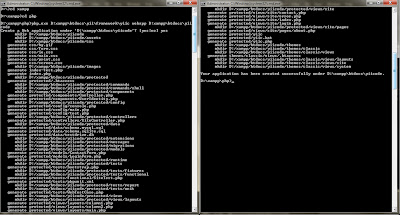
7. Typing again php.exe D:\ xampp\ htdocs\ yii\framework\yiic webapp D:\xampp\htdocs\yiicode
Description: D: \ xampp \ htdocs \ yiicode means the application will be installed on xampp - htdocs, while yiicode is the name of my application to be made

Microsoft Windows [Version 6.1.7600]
Copyright 2009 Microsoft Corporation. All rights reserved
C: \ Users \ santje> d:
D: \> cd xampp
D: \ xampp> cd php
D: \ xampp \ php>
D: \ xampp \ php> php.exe D:\ xampp\yii\ framework\yiic\ webapp D:\xampp\ htdocs\ yiicode
Create a Web application under 'D: \ xampp \ htdocs \ yiicode'? [yes: no]

5. The last typed yes and enter.
Your application has been succesfully created under D: \ xampp \ htdocs \ yiicode

6. Open xampp-control.exe click the start button on the Apache and MySQL, and then open your web browser and type localhost / yiicode. Congratulations you have successfully created your first application yii

Wednesday, 6 November 2013

xampp import large sql file

 You probably tried to upload too large file – phpmyadmin


Here are the solutions to solve the problem:

1. Increase the values for upload_max_filesize, memory_limit and post_max_size directories in php.ini as per requirements and restart the server

2. You can upload large sql files by changing some configuration settings in C:\xampp\phpmyadmin\config.inc.php file.

  Open the config.inc.php file and look for $cfg['UploadDir'] and update it as $cfg['UploadDir'] = "upload". If you dont find just open a config.sample.inc.php and copy that line and paste into your actuall config.inc.php file and update as i mentioned above. Finally it will be:

    $cfg['UploadDir'] = "upload"

Save the file and create upload folder under phpmyadmin folder.

   C:\xampp\apps\phpmyadmin\upload\

Then copy your all .sql files into this folder.

Now when you go to phpmyadmin import page you will see  a drop down with list of .sql files below the browse button.

You can now select this and begin the import.

If your having problem in Windows 7 and  32 bit system you need verify that your values should be under 2048M, then only it will work.

Reason:

"The largest signed integer for a 32bit operating system is -2,147,483,647 - 2,147,483,647 since 2048M = 2147483648 bytes, it was going higher than it could calculate, so it was defaulting to a negative integer. Hence the reason why the log file states -2147483648 bytes."


If you get Script timeout passed, if you want to finish import, please resubmit same file and import will resume.


add $cfg['ExecTimeLimit'] = 0; this line in config.inc.php file.
By default setting for ExecTimeLimit is 300 seconds.

Wednesday, 18 September 2013

Remove Switch StoreView URL in Magento

Remove Switch StoreView URL  in Magento

www,mydomain.com/sp/?___from_store=default
or
www,mydomain.com/fr/?___from_store=sp

How to Avoid this   /fr/?___from_store=sp from url


Step ( i ):-

     System->Configuration->Web->Url Options. and Add Store Code to Urls change 'Yes'.


Step (ii) :-

If you look into /app/code/core/Mage/Core/Model/Store.php you see following function:

public function getCurrentUrl($fromStore = true)

So without changing any core code grab /app/design/frontend/base/default/template/page/switch/languages.phtml

 Change the line

<option value="<?php echo $_lang->getCurrentUrl() ?>"<?php echo $_selected ?>><?php echo $this->htmlEscape($_lang->getName()) ?></option>

to
<option value="<?php echo $_lang->getCurrentUrl(false) ?>"<?php echo $_selected ?>><?php echo $this->htmlEscape($_lang->getName()) ?></option>

and put the changed file into the corresponding path of your theme folder.
And now you have clean URLs. 

Sunday, 15 September 2013

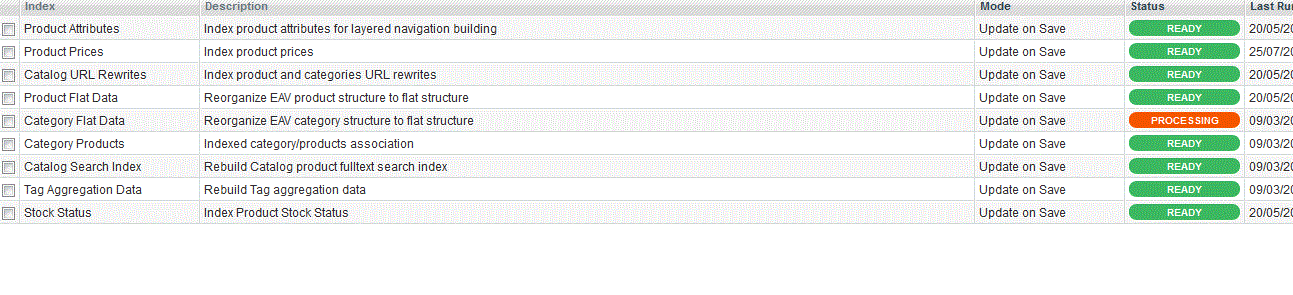
Magento: Category Flat Data reindex


 The reason for this issue is because the dabase migration cross over the server, the index was changed during the migration. 


ALTER TABLE catalog_category_entity ENGINE=INNODB;
ALTER TABLE core_store ENGINE=INNODB;


Note: I have used this for Magento ver. 1.7.0.2 its work me.

Friday, 13 September 2013

How to add search by category in magento mini search

There is no free extension in magento commerce which will help you to search your store with particular category. I tried from myself and able to do, I am sharing my exprerience here with.
First create the drop down list of all category in form.mini.phtml

<select name="category" id="category_search_field">
<option value="">-- Any Category --</option>
<?php foreach ($catalog->getStoreCategories() as $_category): ?>
<?php if($_category->hasChildren()): ?>
<option class="parent-cat" value="<?php echo $_category->getId(); ?>"><?php echo $_category->getName();?></option>
<?php foreach ($_category->getChildren() as $subcategory):
if($subcategory->getIsActive()) : ?>
<option value="<?php echo $subcategory->getId(); ?>"<?php echo ($this->getRequest()->getQuery('category') == $subcategory->getId() ? ' selected="selected"': "") ?>><?php echo $subcategory->getName(); ?></option>
<?php endif; endforeach; ?>
<?php elseif($_category->getIsActive()): ?>
<option value="<?php echo $_category->getId(); ?>"><?php echo $_category->getName();?></option>
<?php endif; ?>
<?php endforeach ?>
</select>


Now go to app/code/core/Mage/CatalogSearch/Helper and open the Data.php and add the below code

public function getStoreCategories(){
$helper = Mage::helper('catalog/category');
return $helper->getStoreCategories();
}


public function getSelectedCategory(){
 $catid = (int)addslashes($_REQUEST['category']);
 $cat="";
  if($catid>1)
   $cat = Mage::getModel('catalog/category')->load($catid);
 return $cat;
}


Now go to app/code/core/Mage/CatalogSearch/Model and open the Layer.php
replace

public function prepareProductCollection($collection){
$collection
->addAttributeToSelect(Mage::getSingleton('catalog/config')->getProductAttributes())
->addSearchFilter(Mage::helper('catalogsearch')->getQuery()->getQueryText())
->setStore(Mage::app()->getStore())
->addMinimalPrice()
->addFinalPrice()
->addTaxPercents()
->addStoreFilter()
->addUrlRewrite();
Mage::getSingleton('catalog/product_status')->addVisibleFilterToCollection($collection);
Mage::getSingleton('catalog/product_visibility')->addVisibleInSearchFilterToCollection($collection);
return $this;
}

with
public function prepareProductCollection($collection){
if(Mage::helper('catalogsearch')->getSelectedCategory()!="")
{
$collection
->addAttributeToSelect(Mage::getSingleton('catalog/config')->getProductAttributes())
->addSearchFilter(Mage::helper('catalogsearch')->getQuery()->getQueryText())
->setStore(Mage::app()->getStore())
->addMinimalPrice()
->addFinalPrice()
->addTaxPercents()
->addStoreFilter()
->addCategoryFilter(Mage::helper('catalogsearch')->getSelectedCategory())
->addUrlRewrite();
}
else
{
$collection
->addAttributeToSelect(Mage::getSingleton('catalog/config')->getProductAttributes())
->addSearchFilter(Mage::helper('catalogsearch')->getQuery()->getQueryText())
->setStore(Mage::app()->getStore())
->addMinimalPrice()
->addFinalPrice()
->addTaxPercents()
->addStoreFilter()
->addUrlRewrite();
}
Mage::getSingleton('catalog/product_status')->addVisibleFilterToCollection($collection);
Mage::getSingleton('catalog/product_visibility')->addVisibleInSearchFilterToCollection($collection);

return $this;
}
save and Enjoy.

Paypal Standard: “Unable to process payment….”

Paypal Address Overridding in Payal Standard in Magent

PaypalPayment Standard Issue
Unable to process payment. Please contact the merchant as the shipping address provided by the merchant is invalid, and the merchant has requested that your order must be shipped to that address.


Solution:-

( i ) Copy
app/code/core/Mage/Paypal/Model/Api/Standard.php
to
app/code/local/Mage/Paypal/Model/Api/Standard.php

(or)

( ii ) Edit 
app/code/core/Mage/Paypal/Model/Api/Standard.php
In the function named _importAddress(&$request)

line number: 211 in magento 1.7.0.2
set
$request['address_override'] = 1;
to
$request['address_override'] = 0;

It is tested with magento 1.7.0.2