Wednesday, 6 November 2013

xampp import large sql file

 You probably tried to upload too large file – phpmyadmin


Here are the solutions to solve the problem:

1. Increase the values for upload_max_filesize, memory_limit and post_max_size directories in php.ini as per requirements and restart the server

2. You can upload large sql files by changing some configuration settings in C:\xampp\phpmyadmin\config.inc.php file.

  Open the config.inc.php file and look for $cfg['UploadDir'] and update it as $cfg['UploadDir'] = "upload". If you dont find just open a config.sample.inc.php and copy that line and paste into your actuall config.inc.php file and update as i mentioned above. Finally it will be:

    $cfg['UploadDir'] = "upload"

Save the file and create upload folder under phpmyadmin folder.

   C:\xampp\apps\phpmyadmin\upload\

Then copy your all .sql files into this folder.

Now when you go to phpmyadmin import page you will see  a drop down with list of .sql files below the browse button.

You can now select this and begin the import.

If your having problem in Windows 7 and  32 bit system you need verify that your values should be under 2048M, then only it will work.

Reason:

"The largest signed integer for a 32bit operating system is -2,147,483,647 - 2,147,483,647 since 2048M = 2147483648 bytes, it was going higher than it could calculate, so it was defaulting to a negative integer. Hence the reason why the log file states -2147483648 bytes."


If you get Script timeout passed, if you want to finish import, please resubmit same file and import will resume.


add $cfg['ExecTimeLimit'] = 0; this line in config.inc.php file.
By default setting for ExecTimeLimit is 300 seconds.

Wednesday, 18 September 2013

Remove Switch StoreView URL in Magento

Remove Switch StoreView URL  in Magento

www,mydomain.com/sp/?___from_store=default
or
www,mydomain.com/fr/?___from_store=sp

How to Avoid this   /fr/?___from_store=sp from url


Step ( i ):-

     System->Configuration->Web->Url Options. and Add Store Code to Urls change 'Yes'.


Step (ii) :-

If you look into /app/code/core/Mage/Core/Model/Store.php you see following function:

public function getCurrentUrl($fromStore true)

So without changing any core code grab /app/design/frontend/base/default/template/page/switch/languages.phtml

 Change the line

<option value="<?php echo $_lang->getCurrentUrl() ?>"<?php echo $_selected ?>><?php echo $this->htmlEscape($_lang->getName()) ?></option>

to
<option value="<?php echo $_lang->getCurrentUrl(false) ?>"<?php echo $_selected ?>><?php echo $this->htmlEscape($_lang->getName()) ?></option>

and put the changed file into the corresponding path of your theme folder.
And now you have clean URLs. 

Sunday, 15 September 2013

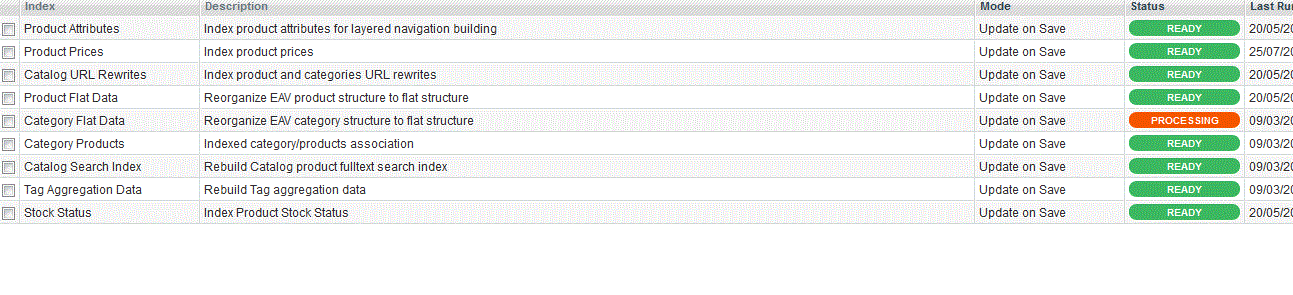
Magento: Category Flat Data reindex


 The reason for this issue is because the dabase migration cross over the server, the index was changed during the migration. 


ALTER TABLE catalog_category_entity ENGINE=INNODB;
ALTER TABLE core_store ENGINE=INNODB;


Note: I have used this for Magento ver. 1.7.0.2 its work me.

Friday, 13 September 2013

How to add search by category in magento mini search

There is no free extension in magento commerce which will help you to search your store with particular category. I tried from myself and able to do, I am sharing my exprerience here with.
First create the drop down list of all category in form.mini.phtml

<select name="category" id="category_search_field">
<option value="">-- Any Category --</option>
<?php foreach ($catalog->getStoreCategories() as $_category): ?>
<?php if($_category->hasChildren()): ?>
<option class="parent-cat" value="<?php echo $_category->getId(); ?>"><?php echo $_category->getName();?></option>
<?php foreach ($_category->getChildren() as $subcategory):
if($subcategory->getIsActive()) : ?>
<option value="<?php echo $subcategory->getId(); ?>"<?php echo ($this->getRequest()->getQuery('category') == $subcategory->getId() ? ' selected="selected"': "") ?>><?php echo $subcategory->getName(); ?></option>
<?php endif; endforeach; ?>
<?php elseif($_category->getIsActive()): ?>
<option value="<?php echo $_category->getId(); ?>"><?php echo $_category->getName();?></option>
<?php endif; ?>
<?php endforeach ?>
</select>


Now go to app/code/core/Mage/CatalogSearch/Helper and open the Data.php and add the below code

public function getStoreCategories(){
$helper = Mage::helper('catalog/category');
return $helper->getStoreCategories();
}


public function getSelectedCategory(){
 $catid = (int)addslashes($_REQUEST['category']);
 $cat="";
  if($catid>1)
   $cat = Mage::getModel('catalog/category')->load($catid);
 return $cat;
}


Now go to app/code/core/Mage/CatalogSearch/Model and open the Layer.php
replace

public function prepareProductCollection($collection){
$collection
->addAttributeToSelect(Mage::getSingleton('catalog/config')->getProductAttributes())
->addSearchFilter(Mage::helper('catalogsearch')->getQuery()->getQueryText())
->setStore(Mage::app()->getStore())
->addMinimalPrice()
->addFinalPrice()
->addTaxPercents()
->addStoreFilter()
->addUrlRewrite();
Mage::getSingleton('catalog/product_status')->addVisibleFilterToCollection($collection);
Mage::getSingleton('catalog/product_visibility')->addVisibleInSearchFilterToCollection($collection);
return $this;
}

with
public function prepareProductCollection($collection){
if(Mage::helper('catalogsearch')->getSelectedCategory()!="")
{
$collection
->addAttributeToSelect(Mage::getSingleton('catalog/config')->getProductAttributes())
->addSearchFilter(Mage::helper('catalogsearch')->getQuery()->getQueryText())
->setStore(Mage::app()->getStore())
->addMinimalPrice()
->addFinalPrice()
->addTaxPercents()
->addStoreFilter()
->addCategoryFilter(Mage::helper('catalogsearch')->getSelectedCategory())
->addUrlRewrite();
}
else
{
$collection
->addAttributeToSelect(Mage::getSingleton('catalog/config')->getProductAttributes())
->addSearchFilter(Mage::helper('catalogsearch')->getQuery()->getQueryText())
->setStore(Mage::app()->getStore())
->addMinimalPrice()
->addFinalPrice()
->addTaxPercents()
->addStoreFilter()
->addUrlRewrite();
}
Mage::getSingleton('catalog/product_status')->addVisibleFilterToCollection($collection);
Mage::getSingleton('catalog/product_visibility')->addVisibleInSearchFilterToCollection($collection);

return $this;
}
save and Enjoy.

Paypal Standard: “Unable to process payment….”

Paypal Address Overridding in Payal Standard in Magent

PaypalPayment Standard Issue
Unable to process payment. Please contact the merchant as the shipping address provided by the merchant is invalid, and the merchant has requested that your order must be shipped to that address.


Solution:-

( i ) Copy
app/code/core/Mage/Paypal/Model/Api/Standard.php
to
app/code/local/Mage/Paypal/Model/Api/Standard.php

(or)

( ii ) Edit 
app/code/core/Mage/Paypal/Model/Api/Standard.php
In the function named _importAddress(&$request)

line number: 211 in magento 1.7.0.2
set
$request['address_override'] = 1;
to
$request['address_override'] = 0;

It is tested with magento 1.7.0.2 

Saturday, 31 August 2013


Shipping Cart price Rules into Sales->Orders

magento-root-folder/app/design/adminhtml/default/default/template/sales/order/view/info.php


<div class="entry-edit">
<!--Shipping Address-->
<div class="entry-edit">
<div class="entry-edit-head">
     <h4 class="icon-head head-shipping-address">
          <?php echo Mage::helper('sales')->__('Shopping Cart Price Rule') ?>
    </h4>
</div>
   <fieldset>
      <table cellspacing="0" class="form-list">
       <?php if($this->getOrder()->getCouponCode() && $this->getOrder()->getCouponRuleName()): ?>
       <tr>
       <td class="label"><label><?php echo Mage::helper('sales')->__('Rule Name') ?></label></td>
       <td class="value"><strong><?php echo $this->getOrder()->getCouponRuleName(); ?></strong></td>
       </tr>
       <tr>
       <td class="label"><label><?php echo Mage::helper('sales')->__('Coupon Code') ?></label></td>
       <td class="value"><strong><?php echo $this->getOrder()->getCouponCode(); ?></strong></td>
       </tr>
       <?php else: ?>
       <tr>
       <td class="label"><label><?php echo Mage::helper('sales')->__('Coupon Code Details') ?></label>            </td>
       <td class="value"><strong><?php echo 'There is no Coupon Code in use'; ?></strong></td>
       </tr>
       <?php endif; ?>
       </table>
        </fieldset>
    </div>
</div>
<div class="clear"></div>

Remove customer and reset id in magento

Run the Query in phpmyadmin.
Note: Before use Backup your database:
SET FOREIGN_KEY_CHECKS=0;

    TRUNCATE TABLE `customer_address_entity`;
    TRUNCATE TABLE `customer_address_entity_datetime`;
    TRUNCATE TABLE `customer_address_entity_decimal`;
    TRUNCATE TABLE `customer_address_entity_int`;
    TRUNCATE TABLE `customer_address_entity_text`;
    TRUNCATE TABLE `customer_address_entity_varchar`;
    TRUNCATE TABLE `customer_entity`;
    TRUNCATE TABLE `customer_entity_datetime`;
    TRUNCATE TABLE `customer_entity_decimal`;
    TRUNCATE TABLE `customer_entity_int`;
    TRUNCATE TABLE `customer_entity_text`;
    TRUNCATE TABLE `customer_entity_varchar`;
SET FOREIGN_KEY_CHECKS=1;